切换导航
简历
工具
演示
查询
导航菜单
服务端
30
前端
114
数据库
82
进阶开发
8
桌面程序
2
QA
15
软件使用
36
规范协议
5
操作系统
11
AI
0
复用资源
6
硬件
0
标签
Git
办公软件
开发工具
浏览器
工具箱
Web服务器
Gitee
Github
SVN
SQL Server / SSMS
Visual Studio
VS Code
nginx
微信
PS
SSH
Hyper
gitblit
Monorepo
VMware
IntelliJ IDEA
DataGrip
外部链接
.NET Core SDK和运行时安装包
淘宝 NPM 镜像
查询网
Tables Generator线上表格转换工具
引用cdn在线脚本和样式
首页
软件使用
VS Code 自定义代码段
[TOC] ## 1. VsCode中自定义代码段 为什么使用自定义代码段:当我们只要输入简单的缩写字母就可以在编辑器中输出自定义的代码段,大大缩减了重复代码的编辑时间 ### 1.1. 操作步骤 ### 1.1.1. 往已有代码段配置的文件中插入内容 下面是以json文件为例查找配置文件 设置步骤:菜单栏选择【文件】->【首选项】->【配置用户代码片段】->【弹出选择输入框】-> 输入json即可在弹出的编辑框中配置自己的代码片段 ### 1.1.2. 给当前开发的项目创建代码段配置文件 设置步骤:菜单栏选择【文件】->【首选项】->【配置用户代码片段】->【弹出选择输入框】-> 在输入框中找到项目所在的目录创建新的配置文件 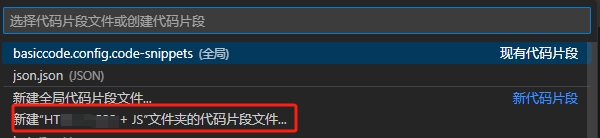 配置完成后在你的项目文件夹中就会出现对应的配置文件,文件后缀为 `code-snippets` 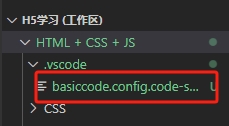 ## 2. 代码端配置 选择自定义代码段适用的文件类型,这里除了系统内置的类型,同样也可以自定义新的文件类型,下面是一些 html 文件的自定义代码段配置 ### 2.1. 快速创建vue基础代码 ```json { // Place your snippets for html here. Each snippet is defined under a snippet name and has a prefix, body and // description. The prefix is what is used to trigger the snippet and the body will be expanded and inserted. Possible variables are: // $1, $2 for tab stops, $0 for the final cursor position, and ${1:label}, ${2:another} for placeholders. Placeholders with the // same ids are connected. // Example: // "Print to console": { // "prefix": "log", // "body": [ // "console.log('$1');", // "$2" // ], // "description": "Log output to console" // } "fast create vue html": { "prefix": "vh", //唤醒代码块的命令 "body": [ "<html>", "<head>", " <meta charset=\"utf-8\">", " <meta name=\"viewport\" content=\"width=device-width,user-scalable=no,initial-scale=1.0, maximun-scale=1.0, minimun-scale=1.0\">", " <link rel=\"stylesheet\" href=\"https://cdnjs.cloudflare.com/ajax/libs/bootstrap/4.5.3/css/bootstrap.min.css\">", " <script src=\"https://cdn.bootcss.com/vue/2.5.2/vue.js\"></script>", "</head>", "<div id=\"app\">", "$1", "</div>", "<script type=\"text/javascript\">", " var vm = new Vue({", " el: \"#app\",", " data: {", " },", " methods: {}", " })", "</script>", "</html>" ], //代码块的主体 "description": "快速创建vue基础代码" // 获取参数错误提示 } } ``` 将上面的配置保存后,创建一个html文件,只要输入vh就可以出现上面自定的vue初始化代码段了。vh就是代码的唤醒指令,fast create vue html 是输入vh后跟随的提示,description可以对此代码段进行一个描述介绍,$1是创建完代码段后光标停放的位置。 ### 2.2. 快速创建bootstrap表格 ```json "fast create bootstrap table": { "prefix": "bota", //唤醒代码块的命令 "body": [ "<table class=\"table table-bordered table-hover table-striped\">", " <thead>", " <tr>", " <th>ID</th>", " <th>名称</th>", " <th>时间</th>", " <th>操作</th>", " </tr>", " </thead>", " <tbody>", " <tr>", " <td>1</td>", " <td></td>", " <td></td>", " <td></td>", " </tr>", " </tbody>", "</table>" ], "description": "快速创建bootstrap表格" // 获取参数错误提示 } ``` ### 2.3. 快速创建html基础代码 ```json "fast create html": { "prefix": "chtml", //唤醒代码块的命令 "body": [ "<!DOCTYPE html>", "<html>", "<head>", " <meta charset=\"utf-8\">", " <meta name=\"viewport\" content=\"width=device-width,user-scalable=no,initial-scale=1.0, maximun-scale=1.0, minimun-scale=1.0\">", "</head>", "<div id=\"app\">", "$1", "</div>", "<script type=\"text/javascript\">", "</script>", "</html>" ], //代码块的主体 "description": "快速创建html基础代码" // 获取参数错误提示 } ```
扫一扫手机看
点击排行
windows 文件资源管理器使用
Layui 弹窗open使用说明
SQL Server 中字符串函数使用
C# 使用QQ邮箱代理做邮件接收功能
SQL Server关于apply的两种形式cross apply 和 outer apply
ASP.NET MVC 模型的自定义验证
nvm安装及常用命令
SQL Server 中数据类型转换
SQL Server 中WITH AS短语的使用
IE浏览器下AJAX缓存问题导致数据不更新的解决办法
订阅号