切换导航
简历
工具
演示
查询
导航菜单
服务端
30
前端
114
数据库
82
进阶开发
8
桌面程序
2
QA
15
软件使用
36
规范协议
5
操作系统
11
AI
0
复用资源
6
硬件
0
标签
HTML
正则表达式
Json
包管理工具
vite
CSS
XPath
JavaScript
Jquery
less
ES6
Vue
React
vue 3
Layui
editor.md
sea.js
Zepto.js
mysql.js
mssql.js
NodeJs
Express
前端template
YAML
杂项
外部链接
.NET Core SDK和运行时安装包
淘宝 NPM 镜像
查询网
Tables Generator线上表格转换工具
引用cdn在线脚本和样式
首页
前端
CSS 文本换行效果和文字效果
[TOC] ## 1. 文字换行 ### 1.1. 不换行,溢出使用省略号代替 ```CSS div{ white-space:nowrap; overflow:hidden; text-overflow:ellipsis; } ``` `white-space:nowrap;`只有遇到`<br />`才会换行 ### 1.2. 强制换行的几种样式 ```CSS div{ word-break:break-all; /*只对英文起作用,以字母作为换行依据*/ word-wrap:break-word; /*只对英文起作用,以单词作为换行依据*/ white-space:pre-wrap; /*只对中文起作用,强制换行*/ } ``` ### 1.3. 文字换行溢出使用省略号代替 **思路说明:** + 利用float浮动的特性让`...`省略号右浮动到文字的右边 + 然后利用伪元素内容占位文字显示的区域, **样式代码:** ```CSS #app { width: 360px; height: 140px; margin: auto; padding: 10px; background-color: #a9c7ee; margin-top: 20px; } .con { background-color: #8bb4e9; width: 340px; height: 120px; overflow: hidden; padding: 0px 5px; } .con::before { height: 95px; /*刚好能让省略...显示在右下角*/ content: ''; display: block; } .more { float: right; margin-right: 5px; } .content { margin-top: -95px; line-height: 24px; font-size: 14px; } ``` **页面代码:** ```HTNL <div id="app"> <div class="con"> <div class="more">...</div> <div class="content"> 林剑:中方欢迎克罗地亚外长拉德曼访华。中国同克罗地亚传统友好,两国全面合作伙伴关系发展顺利,在共建“一带一路”和中国—中东欧国家合作方面取得积极成果。中方高度重视中克关系发展,愿同克方一道,以此访为契机,加强两国发展战略对接,深挖务实合作潜力,密切人文交流对话,开启中克全面合作伙伴关系新篇章。 </div> </div> </div> <div id="app"> <div class="con"> <div class="more">...</div> <div class="content"> Lin Jian: China welcomes Gordan Grlić Radman, Croatia’s Minister of Foreign and European Affairs, to visit China. The two countries have enjoyed traditional friendship. The China-Croatia comprehensive cooperative partnership has maintained steady growth, and Belt and Road cooperation and cooperation between China and Central and Eastern European countries have borne positive results. China attaches great importance to its relations with Croatia. Through this visit, we stand ready to work with Croatia to further align our development strategies, unlock potential for practical cooperation, have closer people-to-people and cultural exchange and dialogue, and open up a new chapter for our comprehensive cooperative partnership. </div> </div> </div> ``` **效果展示:** 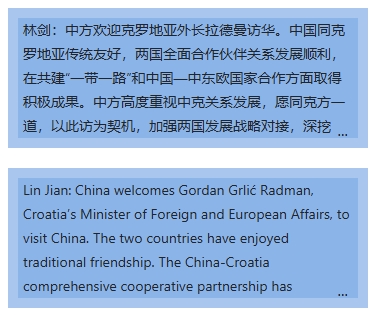 ## 2. 文字特效 ### 2.1. 给文字加删除线 ```HTML <html> <head> <style> strike { text-decoration: line-through; /* 添加删除线 */ } no-strike { text-decoration: none; /* 移除删除线 */ } </style> </head> <body> <p class="strike">这段文字有删除线</p> <p class="no-strike">这段文字没有删除线</p> </body> </html> ``` + 基础用法:使用 text-decoration: line-through; 为文本添加删除线,text-decoration: none; 则可移除已有的删除线。 你还可以组合其他装饰效果,例如:`text-decoration: underline overline line-through;`这样会同时显示下划线、上划线和删除线。 + 自定义样式 CSS3 提供了更多控制选项:这样可以改变删除线的样式和颜色,使其更符合设计需求 ```CSS custom-strike { text-decoration-line: line-through; text-decoration-style: wavy; /* 波浪线 */ text-decoration-color: red; /* 红色删除线 */ } ``` + 动态控制 可通过伪类或 JavaScript 动态添加/移除删除线: ```CSS hover-remove:hover { text-decoration: none; } ``` ```javascript function toggleStrike() { const el = document.getElementById("task"); el.classList.toggle("strike"); } ```
扫一扫手机看
点击排行
windows 文件资源管理器使用
Layui 弹窗open使用说明
SQL Server 中字符串函数使用
C# 使用QQ邮箱代理做邮件接收功能
SQL Server关于apply的两种形式cross apply 和 outer apply
ASP.NET MVC 模型的自定义验证
nvm安装及常用命令
SQL Server 中数据类型转换
SQL Server 中WITH AS短语的使用
IE浏览器下AJAX缓存问题导致数据不更新的解决办法
订阅号