切换导航
简历
工具
演示
查询
导航菜单
服务端
30
前端
114
数据库
82
进阶开发
8
桌面程序
2
QA
15
软件使用
36
规范协议
5
操作系统
11
AI
0
复用资源
6
硬件
0
标签
HTML
正则表达式
Json
包管理工具
vite
CSS
XPath
JavaScript
Jquery
less
ES6
Vue
React
vue 3
Layui
editor.md
sea.js
Zepto.js
mysql.js
mssql.js
NodeJs
Express
前端template
YAML
杂项
外部链接
.NET Core SDK和运行时安装包
淘宝 NPM 镜像
查询网
Tables Generator线上表格转换工具
引用cdn在线脚本和样式
首页
前端
Flex 布局应用场景实例
[TOC] ## 1. 元素对齐 ### 1.1. 图标与文字水平居中对齐 **代码展示:** ```CSS .horizontal div { display: flex; flex-wrap: wrap; align-items: center; border-bottom: 1px solid #ccc; padding: 5px 0px; } .horizontal img { width: 45px; height: 45px; margin-right: 10px; } .horizontal span { width: calc(100% - 60px); font-size: 14px; } .vertical { display: flex; justify-content: space-around; } ``` ```HTML <div class="horizontal"> <div> <img src="../../Image/rent.png"> <span>2024年3月4日至11日,全国两会在北京召开。近3000名全国人大代表和2000多名全国政协委员齐聚北京,共赴这场春天的盛会。</span> </div> <div><img src="../../Image/sale.png"> <span>今年全国两会期间,习近平总书记活动紧凑、日程满满,同代表委员倾心交流、共商国是。交流中,民生家常直抵百姓关切;言谈间,真情话语令人倍感温暖。</span> </div> </div> ``` **效果展示:** 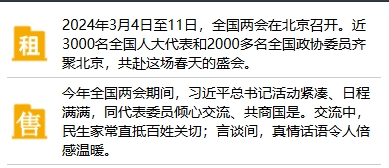 ### 1.2. 图标与文字垂直居中对齐 **代码展示:** ```CSS .vertical { display: flex; justify-content: space-around; } .vertical div { width: 100px; border: 1px solid #ccc; display: flex; flex-flow: column; align-items: center; } .vertical img { width: 45px; height: 45px; } .vertical span { font-size: 14px; } ``` ```HTML <div class="vertical"> <div> <img src="../../Image/rent.png"> <span>租赁</span> </div> <div> <img src="../../Image/sale.png"> <span>买卖</span> </div> <div> <img src="../../Image/rank.png"> <span>报表</span> </div> <div> <img src="../../Image/reward.png"> <span>荣誉</span> </div> </div> ``` **效果展示:**  ### 1.3. 骰子布局案例 **公共样式** ```CSS * { box-sizing: border-box; } html, body { height: 100%; } body { display: flex; align-items: center; justify-content: center; vertical-align: center; flex-wrap: wrap; align-content: center; font-family: 'Open Sans', sans-serif; background: linear-gradient(top, #222, #333); } [class$="face"] { margin: 16px; padding: 4px; background-color: #e7e7e7; width: 104px; height: 104px; object-fit: contain; box-shadow: inset 0 5px white, inset 0 -5px #bbb, inset 5px 0 #d7d7d7, inset -5px 0 #d7d7d7; border-radius: 10%; } .pip { display: block; width: 24px; height: 24px; border-radius: 50%; margin: 4px; background-color: #333; box-shadow: inset 0 3px #111, inset 0 -3px #555; } ``` **效果图**  #### 1.3.1. 骰子一点 ```HTML <style> .first-face { display: flex; justify-content: center; align-items: center; } </style> <div class="first-face"> <span class="pip"></span> </div> ``` #### 1.3.2. 骰子两点 ```HTML <style> .second-face { display: flex; justify-content: space-between; } .second-face .pip:nth-of-type(2) { align-self: flex-end; } </style> <div class="second-face"> <span class="pip"></span> <span class="pip"></span> </div> ``` #### 1.3.3. 骰子三点 ```HTML <style> .third-face { display: flex; justify-content: space-between; } .third-face .pip:nth-of-type(2) { align-self: center; } .third-face .pip:nth-of-type(3) { align-self: flex-end; } </style> <div class="third-face"> <span class="pip"></span> <span class="pip"></span> <span class="pip"></span> </div> ``` #### 1.3.4. 骰子四点 ```HTML <style> .fourth-face { display: flex; justify-content: space-between; } .fourth-face .column { display: flex; flex-direction: column; justify-content: space-between; } </style> <div class="fourth-face"> <div class="column"> <span class="pip"></span> <span class="pip"></span> </div> <div class="column"> <span class="pip"></span> <span class="pip"></span> </div> </div> ``` #### 1.3.5. 骰子五点 ```HTML <style> .fifth-face { display: flex; justify-content: space-between; } .fifth-face .column { display: flex; flex-direction: column; justify-content: space-between; } .fifth-face .column:nth-of-type(2) { justify-content: center; } </style> <div class="fifth-face"> <div class="column"> <span class="pip"></span> <span class="pip"></span> </div> <div class="column"> <span class="pip"></span> </div> <div class="column"> <span class="pip"></span> <span class="pip"></span> </div> </div> ``` #### 1.3.6. 骰子六点 ```HTML <style> .sixth-face { display: flex; justify-content: space-between; } .sixth-face .column { display: flex; flex-direction: column; justify-content: space-between; } </style> <div class="sixth-face"> <div class="column"> <span class="pip"></span> <span class="pip"></span> <span class="pip"></span> </div> <div class="column"> <span class="pip"></span> <span class="pip"></span> <span class="pip"></span> </div> </div> ``` ## 参考 > [阮一峰的网络日志 Flex 布局教程:实例篇](https://www.ruanyifeng.com/blog/2015/07/flex-examples.html)
扫一扫手机看
点击排行
windows 文件资源管理器使用
Layui 弹窗open使用说明
SQL Server 中字符串函数使用
C# 使用QQ邮箱代理做邮件接收功能
SQL Server关于apply的两种形式cross apply 和 outer apply
ASP.NET MVC 模型的自定义验证
nvm安装及常用命令
SQL Server 中数据类型转换
SQL Server 中WITH AS短语的使用
IE浏览器下AJAX缓存问题导致数据不更新的解决办法
订阅号