切换导航
简历
工具
演示
查询
导航菜单
服务端
30
前端
114
数据库
82
进阶开发
8
桌面程序
2
QA
15
软件使用
36
规范协议
5
操作系统
11
AI
0
复用资源
6
硬件
0
标签
HTML
正则表达式
Json
包管理工具
vite
CSS
XPath
JavaScript
Jquery
less
ES6
Vue
React
vue 3
Layui
editor.md
sea.js
Zepto.js
mysql.js
mssql.js
NodeJs
Express
前端template
YAML
杂项
外部链接
.NET Core SDK和运行时安装包
淘宝 NPM 镜像
查询网
Tables Generator线上表格转换工具
引用cdn在线脚本和样式
首页
前端
JS 操作DOM之iframe节点使用案例
[TOC] ### 1. 案例准备 首先准备三个页面用于演示,分别是mode.html,wu.html,su.html #### 1.1. mode.html ```html <html> <head> <meta charset="utf-8" /> <title>实例模板</title> </head> <body> <div class="body"> <ul> <li>曹操</li> <li>曹植</li> <li>曹丕</li> </ul> </div> <iframe id="wu" src="wu.html" class="wuName"> </iframe> <iframe src="su.html"> </iframe> <script type="text/javascript"> var wuById = document.getElementById("wu") console.log(wuById) var wuByTagName = document.getElementsByTagName("iframe")[0] console.log(wuByTagName) var wuByClassName = document.getElementsByClassName("wuName")[0] console.log(wuByClassName) var wudoc = document.getElementsByClassName("wuName")[0].contentWindow.document console.log(wudoc) var wudoc2 = document.getElementsByClassName("wuName")[0] wudoc2.onload = function () { console.log(wudoc2.contentWindow.document.getElementById("wuchild")) } </script> </body> </html> ``` #### 1.2. wu.html ```html <html> <head> <meta charset="utf-8" /> <title>实例模板</title> </head> <body> <div id="wuchild"> <ul> <li>孙坚</li> <li>孙策</li> <li>孙权</li> </ul> </div> <script type="text/javascript"> var wuParentById = window.parent.document.getElementsByClassName("body")[0] console.log(wuParentById) </script> </body> </html> ``` #### 1.3. su.html ```html <html> <head> <meta charset="utf-8" /> <title>实例模板</title> </head> <body> <div class="su"> <ul> <li>刘备</li> <li>刘禅</li> </ul> </div> <script type="text/javascript"> var wuBrotherById = window.parent.document.getElementById("wu") wuBrotherById.onload = function () { console.log(wuBrotherById.contentWindow.document.getElementById("wuchild")) } </script> </body> </html> ``` ### 2. 获取iframe节点的方式 下面三中方式都能获取到id是wu的iframe标签节点 #### 2.1. getElementById getElementById 获取指定id属性的节点,正常情况下只有一个,id通常情况是唯一的 ```JS document.getElementById("wu") ``` #### 2.2. getElementsByTagName getElementsByTagName 获取指定标签的节点,这里获取的到是一个数组,一个页面上同标签的节点通常会有多个 ```JS document.getElementsByTagName("iframe")[0] ``` #### 2.3. getElementsByClassName getElementsByClassName 获取指定class类名的节点,一个页面中,不同节点可以命名为相同的类名,因此这种方式获取的节点也是一个数组 ```JS document.getElementsByClassName("wuName")[0] ``` > 下图为三种方式 console.log 的结果: >  ### 3. 获取iframe标签节点可能出现的问题 **问题描述:** 直接使用 `document.getElementsByClassName("wuName")[0].contentWindow.document` 获取的结果没有包含iframe下的标签,只有head和body,这是因为iframe元素还没有加载完的结果,console.log结果如下图 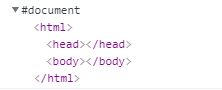 **解决办法:** 要获取iframe下对应的标签,需要等iframe加载完毕才可以,使用下面这段代码即可获取到 ```JS var wudoc2 = document.getElementsByClassName("wuName")[0] wudoc2.onload = function () { console.log(wudoc2.contentWindow.document.getElementById("wuchild")) } ``` > console.log 结果如下图: > 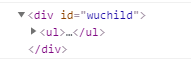 ### 4. 访问iframe父级html节点元素 **示例:**下面这段代码,我们获取到mode.html页面中class为body的div标签元素 ```JS var wuParentById = window.parent.document.getElementsByClassName("body")[0] console.log(wuParentById) ``` ### 5. 访问兄弟级别的ifame节点元素 **示例:**下面这段我们从su.html页面去访问wu.html页面的ul元素,注意这里的iframe元素也要加载完才会显示出结果 ```JS var wuBrotherById = window.parent.document.getElementById("wu") wuBrotherById.onload = function () { console.log(wuBrotherById.contentWindow.document.getElementById("wuchild")) } ``` > console.log 结果如下图: > 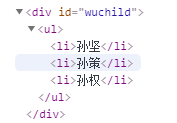 ### 6. 其它说明 iframe之间访问会存在一个跨域的问题,即下面的这个提示 
扫一扫手机看
点击排行
windows 文件资源管理器使用
Layui 弹窗open使用说明
SQL Server 中字符串函数使用
C# 使用QQ邮箱代理做邮件接收功能
SQL Server关于apply的两种形式cross apply 和 outer apply
ASP.NET MVC 模型的自定义验证
nvm安装及常用命令
SQL Server 中数据类型转换
SQL Server 中WITH AS短语的使用
IE浏览器下AJAX缓存问题导致数据不更新的解决办法
订阅号